
Fake Virus
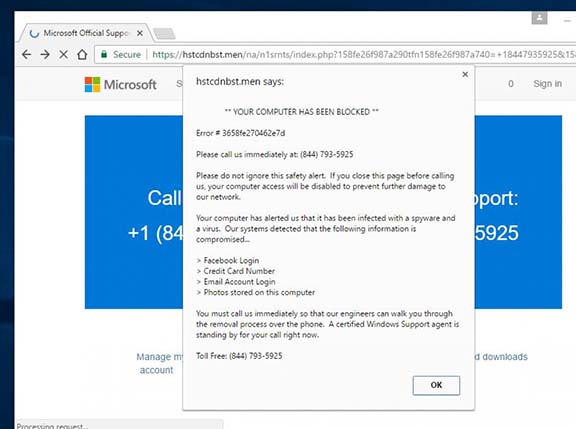
Fake Virus
Safety tip for all those that surf the net. You are surfing along and all of a sudden you get this message box pop up that reads that your computer has been compromised and you need to contact us immediately. It could look like it’s from Microsoft or some other company and will always have a phone number on there. Some even have an annoying computer voice constantly repeating the same message over and over. There are many variations of this and may not look exactly like described but all want the same thing. To call the number or click the link.
DO NOT CALL THE NUMBER. DO NOT CLICK THE LINK. They will want to remote access to your computer. By doing this they will put software on your computer that will compromise your passwords for everything. Such as Banks, Credit Cards, Social Media. etc.
Don’t Panic. Follow the steps below.
1. Most likely your computer is not infected with any virus but the website you visited most likely has some compromising code that caused that to pop up.
2. Close out of your internet browsers. If you are unable to click the browser closed follow these steps to open the task manager and kill that task manually.
Kill browsing processes
1. On your computer you can hit ctrl + shift + esc to bring up your task manager.
2. If you are using Windows 10 there will be an Apps section under the Processes tab. Find the browser you are using and click it then on the bottom right click end task. Windows 7 users can sort the processes by clicking on the name heading and find ieexplorer.exe or google.exe and kill those tasks.
3. If all is lost and you do not want to go through those steps just do a normal shut down and restart of your computer. Restarting will forcefully close all programs on your computer so if you have a document open that you were working on you may want to save it before doing the shut down.
Once completed if you are still worried then you can run a simple antivirus scan with whatever software you are using.
